Concept Design & Product Exploration
xLingual — a macOS-Native Language Learning System
Explored a native macOS language learning experience designed as a first-class system within Apple’s ecosystem—leveraging OS interaction patterns, design system conventions, and desktop-native behaviors to reduce friction in language acquisition.
Concept Overview
Language learning is often treated as an external, high-friction experience.
xLingual explores what it would look like if:
language learning lived natively inside macOS
system-level patterns reduced cognitive load
learning behaved like a natural extension of the OS
The goal was to design a learning environment that feels as familiar as Finder, Notes, or Settings.
Design Intent
Designed around a core principle:
Reduce platform friction so users can focus entirely on learning.
Key goals:
leverage macOS interaction patterns (navigation, hierarchy, feedback states)
minimize learning curve of the tool itself
create consistent, modular learning flows across languages
embed motivation through system-like feedback loops
System Overview
The experience is structured as five interconnected system layers:
Dashboard → progress + daily learning state
Modules → structured skill-building (reading, writing, speaking)
Games → interactive reinforcement loops
Social Layer → motivation + peer learning
Storefront → physical + digital learning reinforcement
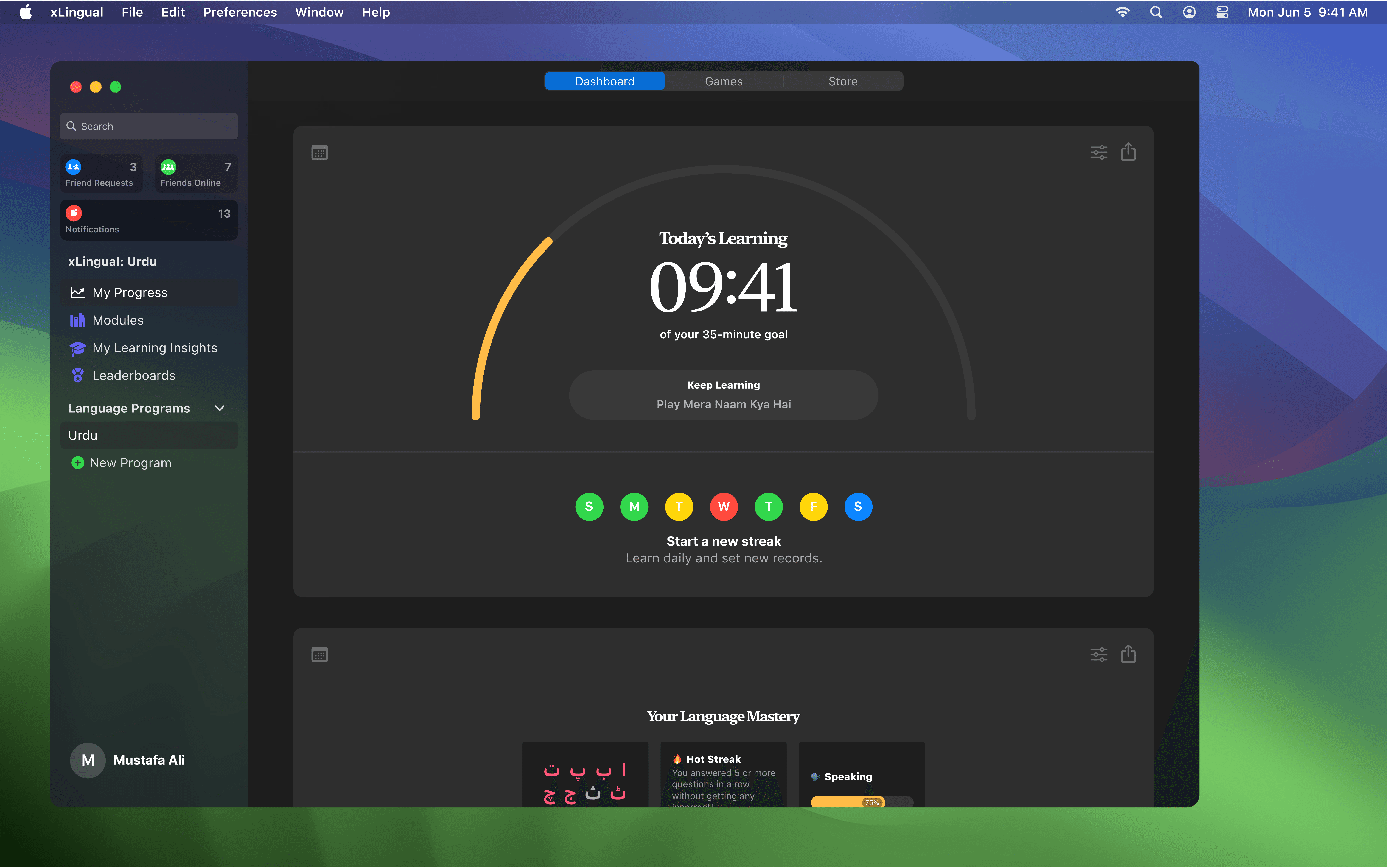
Core Experience — macOS-Inspired Dashboard
The dashboard acts as the system home base:
persistent sidebar navigation (macOS-inspired hierarchy)
daily learning streak + progress visualization
achievement feed and skill mastery tracking
language-specific progress states
Designed to feel like a system utility, not an app experience.
Learning System Design
Modular Learning System
Learning is broken into structured skill tracks:
speaking
writing
reading
Each module behaves like a system component:
repeatable
measurable
progress-tracked
Gamified Reinforcement Layer
Games reinforce learning through:
adaptive difficulty levels
contextual feedback loops
correctness-based grouping systems
optional hints + skip/save logic
Designed to reinforce retention without breaking immersion.


Social Learning Layer
Introduced a lightweight social system inspired by educational environments:
friend activity visibility
messaging + collaboration
shared learning progress
optional competitive leaderboards
Goal: increase consistency through social accountability loops.

Storefront — Offline Learning Extension
Designed a companion storefront for physical learning tools:
reading kits
flashcards
skill-based learning aids
Purpose:
extend learning beyond screen time
reinforce retention through physical interaction
connect digital progress with real-world tools

Design Principles
OS familiarity > Novelty
Used macOS-native patterns to reduce cognitive load and improve intuitiveness.
Learning as a continuous loop
Designed progression systems that reinforce consistency through streaks, achievements, and feedback states.
Modular architecture
Each learning component behaves independently but contributes to a unified progression system.
Motivation through visibility
Progress, streaks, and mastery are always visible to reinforce engagement.
Key Interaction Patterns
persistent sidebar navigation (system-level hierarchy)
progress-first dashboard layout
state-driven UI feedback (success, skip, retry loops)
modular game-to-learning transitions
social presence indicators for motivation


Future Considerations
cross-device continuity (Mac → iPad → iPhone)
accreditation + learning validation systems
template-based expansion for additional languages
expansion into broader academic learning tools
Reflection
This project explored how deeply system-level design patterns can influence learning behavior.
Rather than designing a language learning app, the focus was on:
embedding learning into a familiar OS environment
reducing cognitive friction through system conventions
designing learning as a continuous, integrated experience rather than a standalone task